
BT-PON FTTH ONT Reset if Forget Password
BT-PON ONT Modem last mile connectivity that installed and customer side to connect internet. FTTH ONT is managed and controlled by an OLT device that is installed in the ISP control room. If you are using BT-PON Fiber ONT or your internet provider installed with your internet and you forget the login password you may want to login but the wrong username and password. Making Reset BT PON FTTH ONT from the reset button helps you to restore default settings but it also erases all configuration.
Making reset fiber ONU or Fiber ONT device helps you to fix many bugs such as unstable internet, WiFi signal dropping, and unstable wifi connectivity as well as if your ONT is frequently Stuck or needs to reboot every day.
There are two ways to factory reset BT PON fiber ONT modem if you facing any issues or are unable to login settings. The first way is to reset the BT-PON fiber modem from the settings that you need to login to the device and the second way is to factory reset the BT-PON fiber Modem router using the reset button if you can’t login ONT because forgot the login password.
Factory Reset BT-PON ONT from Settings
Making BT PON ONT modem from the web interface required accessing the web interface from the browser using the BT-PON ONT IP address and username password. The default login username for BT-PON is “admin” or “useradmin” but the password can be different for each modem so check your ONT sticker.
BT-Pon default login IP address – http://192.168.1.1
Username– admin or useradmin
Password- printed to sticker
Note:- Before making settings to full factory reset download configuration backup file so you can restore settings after reset and no manual configuration required.
- Power ON BT-PON ONT WiFi or without WIFI Modem if not power ON.
- Find the default WIFI name and password printed to the sticker if your ONT supports WLAN.
- Use a LAN cable from the Ethernet port to your computer or laptop LAN port for wired connections.
- Go to the browser and access http://192.168.1.1 to the URL bar.
- User default username “admin” or “useradmin” and password as printed to your ONT label.
- Once you log in to the web interface follow the below steps to reset.
- Go to the Admin option from the top menu.
- Admin- Device
- Under the Device option find the left-side menu’s last option “Restore Factory”
- Now press the “Restore” button to factory reset GPON ONT ONU and restore default settings.
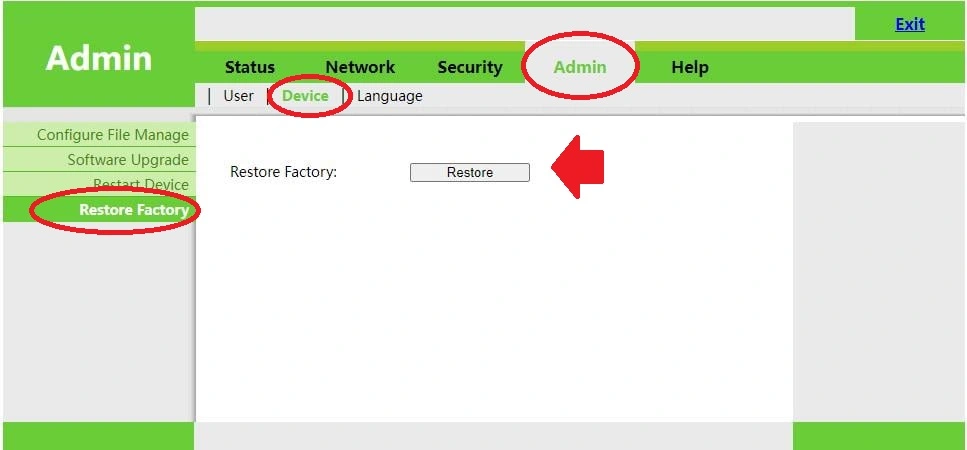
This method is also called the soft reset method and the soft reset is safer than the hard reset because you can download your configuration backup before resetting your modem.
If you are unable to log in due to a forgotten password or any other reason then you can use the next method hard reset to reset the BT-PON FTTH ONU modem without logging into the web interface.
Reset BT-PON GPON/EPON ONU if Forget the login password
Hard reset BT-PON GPON XPON or EPON method is a simple and fast way to restore default settings without logging in to ONT settings. Resetting using the reset button is a physical process so you need to be physically near your Fiber ONT/ONU device. Follow the steps to reset BT-PON GPON ONU using the reset switch.
- Power ON your Fiber ONT modem device first.
- Find a small reset button beside the Ethernet ports or near the Power button. The reset button location can be different for each BT-PON ONT/ONU device.
- Use a needle /paper clip or sharp pin to press the reset button.
- Press and hold the reset button for 10 seconds and then release the button.
- ONT Modem will automatically reboot after executing the reset command.
- After reboot ONU device will restore to the default setting as printed to a sticker.
- Login to your ONT again and set up it again as per your internet settings
Both the above reset methods can be used for BT-PON single-band and dual-band ONT devices as a given model.
- FTTH GPON ONU 1GE 3FE LAN WiFi BT-601GB
- 4FE Tel WiFi GPON ONU BT-BCM6838G
- 1GE 3FE VoIP WiFi EPON ONU BT-BCM6838E+
- 4GE VoIP WIFI6 xPON ONU BT-G711AX
And many other BT-PON ONT routers and modems support this reset guide to restore settings. Also, if you have any other ONT mode that is powered by BT-PON brands then you can use the above steps to reset.
Resetting ONT/ONU or Wireless routers sometimes fixes many problems that we face in the network so if you facing any problem with your ONT device before replacing it just try a full factory reset and setup again and check if your problem is fixed or not.
Related Post
- How to Factory Default BSNL MODEM – 2Way
- Nokia Fiber ONT Login Manual | G-240W
- Login MT-Link Router for first time Setup
- How to Reset PLDT Router and Modem?