
How to Factory Reset MT-Link WiFi Router?
MT-Link Router login and setup is already covered in the last article so if you looking to log in MTLink router then read the previous guide. Apart from login and setup, there are many issue that comes up while using the wifi router in the network long time and we need refresh to the router using a factory reset.
MT-Link Router factory reset fix many router problem that may make router connectivity and speed unstable. Making factory reset of MT-Link 54Mbps Wireless router, 150 Mbps Wireless router as well as 300Mbps Mt-Link n300 Wifi router are the same method and reset guide.
There are two ways to restore the MT-Link Wireless router set to default mode hard reset and soft reset method. The soft reset method is usually useful when you are able to log in to router settings and you can reset the router from software settings that also a safe way to reset the router.
Hard reset a way to regain access if you lost your login password after changing the default password and you unable to access router settings. Hard reset is a physical process so it only can perform while the router is physically reachable. Follow the steps to factory restore the Mt-link WiFi router with or without login.
How to factory reset MT-Link Router from Settings
Resetting’s wireless router from settings also calls a soft resetting process or software reset. This method needs the login credentials of the router to access settings. The login IP address and username password for default mode are available on the router sticker also you can follow the Mt-Link router login guide to access settings.
Note- Before proceed to reset the router do not forget to save the configuration backup file from the back and restore option that you can restore after the router factor reset completed
Steps to soft reset MT-Link router
- Power ON the MT-Link router if not turned on.
- Connect Laptop or mobile from WiFi SSID or using a wired connection from a Lan port.
- Open the web browser and access 192.168.0.1 to the URL bar.
- Use login username and password to access router settings.
- Go to Administration and scroll to the “device management” option.
- Under device management first, click the Back up button to save the configuration.
- Now press the “reset” button to reset the router configuration to default mode.
- Confirm on the next confirmation popup window “Resetting to factory default will clear all settings of the router.” Press the Ok button to confirm reset.
Router will reset the command router will be restarted and take few moments to restore into default mode. Now default IP address and username password will work when printed to stickler.
If you have forgotten the login username and password and are unable to login into router settings then this reset method will help you to restore your MT-Link router and modem device within a few steps.
Factory Reset the MT-link router using the reset button
Reset MTLink router using reset switch also called hard reset method. The hard reset method is usually the same for many leading and popular wireless router brands. It’s a quick way to restore the configuration to factory mode.
- Connect the router to the DC adapter and power ON it.
- Locate a small reset button beside ethernet ports or near the power socket.
- Press and hold the reset button for 10 seconds and release it when the router LED light quickly turn off and turns on again.
- The router process will take a few minutes to restore the configuration to default mode.
- Wait until the router is resetting and restoring to default settings.
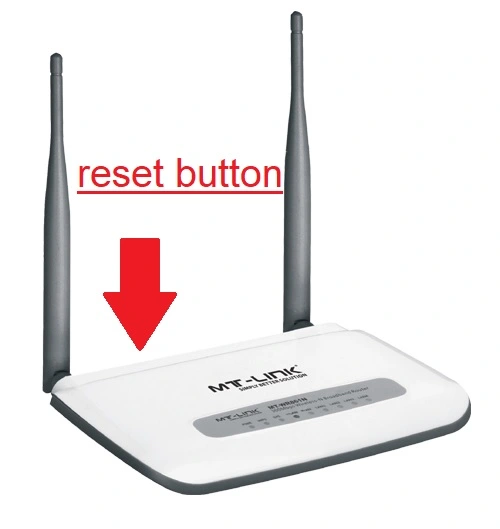
Ping the default IP address as printed to the router sticker and log in again to setup it up again from starting.
This reset method work for all MTLink wireless router and cable modem device so if you have any of the models just follow this reset guide to restore settings into default mode.
Final Words
Resetting the router into default settings erases all configuration from the router and needs to setup it again. You should only go with the reset option either you have internet settings to configure again or it not working and there is no other way to login into the router in case forgotten your login password.
Related Post
- How to Factory Default BSNL MODEM &2Way
- Factory Reset Tenda AC1200 Dual Band WIFI Router-2 Ways
- Vodafone Router Login Guide
- Nokia Fiber ONT Login Manual | G-240W